
Crafting Software & Indie Games
Founded in 1999, Aaron Software LLC initially developed Mac utilities to solve network drive mounting issues and created a Windows inspired dock for macOS. Over time, we focused on building call workflow solutions for Cisco CallManager, delivered MWI functionality for Microsoft Exchange, and partnered with exceptional teams on e-commerce platforms. Today, we craft native iOS applications like Verbal Lens alongside fun, memorable indie games.

From Utility Software to Indie Games
Since 1999, Aaron Software LLC has built software across desktop utilities, enterprise telecommunications, and e-commerce platforms. Today, that experience is focused on making fun, memorable indie games.
Hanukkah Hero
Hanukkah Hero is a passion project born out of fond memories of family, traditions, and warm humor.
Armed with a seasoned cast-iron skillet and hot, crispy golden latkes, our hero takes on shadow creatures to bring warmth and light back to the snow-covered village.
Yiddish Traditions in the Game
Click any card to read about the humor and roots behind the gameplay.
🎬 Hanukkah Hero: Gameplay Demo
An early look at in-engine movement, skillet combat, and festive atmosphere.
Rudolph's Revenge
This is the story of Rudolph, the dark and untold story of how he truly acquired his iconic glowing red nose. Long before the cheerful holiday songs, this innocent deer was tragically struck by an old woman driving on a desolate, icy road and left behind to perish.
That tragic night sparked a catastrophic chain of events, consuming him with bitterness and setting him down a treacherous path of vengeance he would regret forever. Battling the harsh winter elements and his own growing darkness, his journey seemed utterly hopeless until he crossed paths with a heavy set, jolly man named Santa Claus, who offered him a chance at redemption.
"Come light my sleigh tonight."
Intelligent Software & Utilities
Engineered natively with Apple Vision, CoreMotion, PencilKit, and AirPlay for smart daily utility and modern classroom presentations.
Verbal Lens
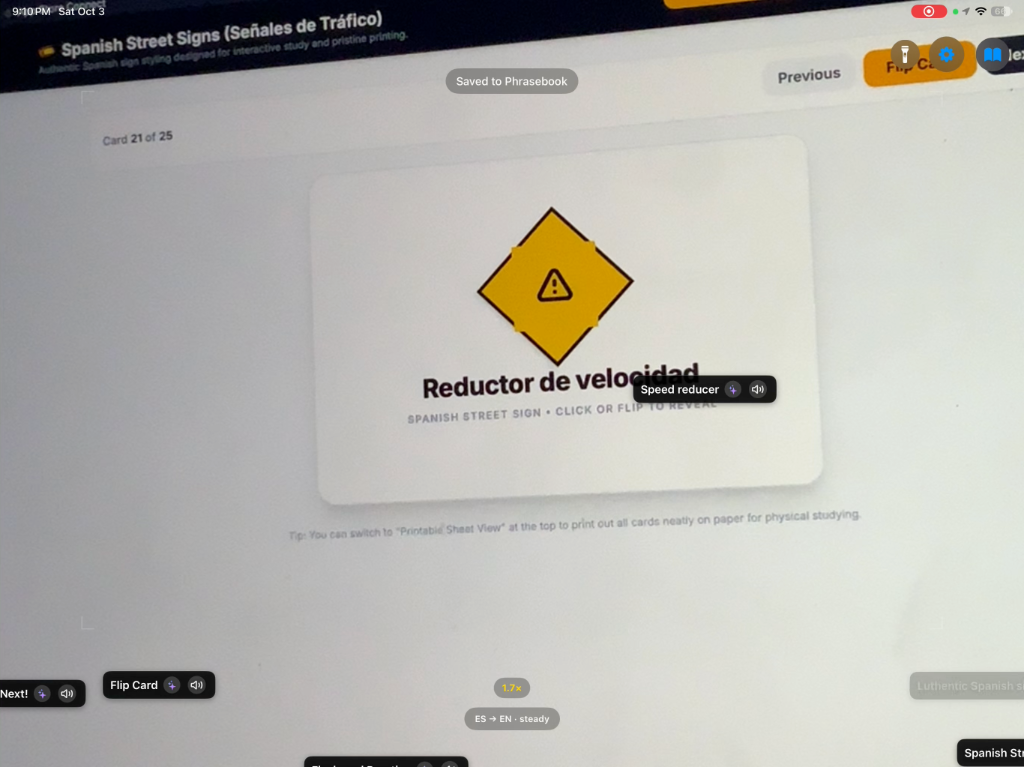
Experience the future of travel and language learning with Verbal Lens; the lightning fast, privacy first camera translator built natively for iOS.
Whether you're exploring a bustling market in Tokyo, deciphering a French menu, or reading international mail, Verbal Lens bridges the language gap instantly. Point your camera at any text, and watch clean, precise translations appear automatically in your preferred system language.
Verbal Lens automatically detects your device's preferred system language.
Don't just translate and forget. Save any translation card into your personal Travel Journal, complete with the original text, translation, image crop, GPS location, a short 3 to 5 second looping video clip of the captured moment, and your own custom user notes for personalized learning and reminders.
Powered by advanced CoreMotion tracking, Verbal Lens dynamically adjusts its processing rate to protect your battery and prevent your phone from overheating when you're on the move.
Tap any translated card to hear it spoken aloud with natural pronunciation, or toggle auto speak mode for hands-free assistance when ordering food or asking for directions.
Built on native Apple frameworks, Verbal Lens keeps your sensitive documents, private mail, and personal travel logs completely secure on your device. Zero cloud dependency, zero data collection.
DocCam
DocCam turns your iPad or iPhone into a powerful, wireless document camera designed for modern classrooms, lecture halls, and remote presentations. Wirelessly stream your workspace directly to an Apple TV, Mac, or interactive display via AirPlay, no expensive hardware, cords, or adapters required.
Unlike traditional scanning apps, DocCam keeps your video feed completely live and responsive: write, demonstrate, and annotate directly over physical documents, books, and lab experiments in real time. Need to hold a page in place? Freeze the frame with a single tap to create an instant static canvas, mark it up, and resume the live stream whenever you're ready.
- Seamless Wireless Mirroring: Stream full-screen live video to Apple TV or AirPlay displays with ultra-low latency.
- Instant Freeze & Resume: Pause live action at any moment to annotate a stable frame, then tap to resume instantly.
- Smart Camera Controls: Quick-zoom presets (1x, 2x, 5x), pinch-to-zoom, tap-to-focus reticle, 90° rotation, horizontal mirror, and flashlight/torch.
- Distraction-Free Mode: Hide all toolbars with a single tap for a clean full-screen display for your audience.
- PencilKit Integration: Low-latency, pressure-sensitive drawing with Apple Pencil or finger touch.
- Versatile Toolset: Pen, highlighter/marker, and eraser with quick-access preset thicknesses and custom color palettes.
- Vanishing Laser Pointer: Draw glowing neon attention trails that automatically fade away after a second—ideal for calling attention to details without cluttering your notes.
- Intelligent UI Auto-Hide: Toolbars automatically fade out while you are actively writing so your canvas remains completely unobstructed.
- Interactive Overlays: Toggle Graph Paper, Cartesian (X-Y) Axes, Lined Paper, Primary 3-Line Handwriting, Dot Matrix, Music Staff, and 3D Isometric grids.
- On-Screen Metric Ruler: Calibrate and measure physical objects directly under the camera feed.
- Reading Spotlight & Reveal Curtain: Direct student focus with circular or boxed spotlights, isolate individual sentences, or use the reveal curtain to show answers step-by-step.
- Document Enhancement Filters: High-contrast Black & White (removes shadows and paper glare), Invert / Dark Mode, and Warm Boost for eye comfort, with exposure and contrast sliders.
- Side-by-Side Split View: Compare a live feed alongside a frozen reference snapshot (student drafts vs. rubrics, before-and-after science steps, or solutions) with an interactive draggable divider.
- Instant On-Device OCR: Recognize printed text directly from the camera feed using Apple Vision.
- Read Aloud & Copy: Tap recognized text segments to have DocCam read them aloud via text-to-speech, or copy text directly to your clipboard.
- Narrated Micro-Lessons: Record your live video, annotations, and microphone voiceover simultaneously with built-in screen recording.
- High-Res Snapshots: Capture composite images combining camera feed, scanner filters, teaching grids, and markup.
- Instant Sharing: Save to Camera Roll or share via AirDrop, Messages, and classroom apps.
Our Journey
How our work evolved over the past 25 years.
Mac Utilities and macOS Dock
Founded in 1999, Aaron Software LLC initially developed Mac utilities to solve network drive mounting issues and created a Windows-inspired dock for macOS.
Cisco CallManager and Microsoft Exchange
Over time, the company shifted its focus toward building call workflow solutions for Cisco CallManager and delivering MWI functionality for Microsoft Exchange.
E-Commerce Development
Freelance software development for diverse e-commerce companies provided great opportunities to partner with exceptional teams.
Indie Games and Hanukkah Hero
Recently, the main effort has transitioned to crafting fun indie games for enjoyment. A recent passion project, Hanukkah Hero, is a game concept drawn from fond memories of a loving upbringing filled with humorous Yiddish traditions. If you know, you know. Ha!
Native iOS Software & Utilities
Continuing our 25-year foundation in Apple platform engineering, we build high-performance mobile and classroom tools: Verbal Lens (lightning-fast, 100% on-device camera translation) and DocCam (wireless document camera with AirPlay, PencilKit, and interactive teaching grids).